LANDR Sampler Review
Unlocking Creativity: A Deep Dive Into The Lander Sampler Plugin
As a music producer, I feel like I’m on a endless quest for the perfect sampler. We all know the struggle: folders overflowing with unorganized sounds, the tedious process of manually key-mapping samples, and the constant search for a workflow that feels intuitive and, most importantly, inspiring. That’s why I was so intrigued when I first heard about the new Lander Sampler plugin. After spending some serious time with it, I’m ready to share my in-depth findings. This isn’t just another sampler; it’s a powerful creative partner that has already started to reshape my approach to making music.
AI Audio Overview provided at bottom of page
One of the most immediate and striking features of the Lander Sampler is its intelligent approach to sample management. My sample library used to be a chaotic mess, but this plugin tackled it head-on. Upon installation, it scanned my entire collection and, like magic, automatically added metadata and tags to every single file. Suddenly, I could use advanced filters to find exactly what I was looking for, whether it was a specific type of drum hit, a certain key, or a particular mood. Then, I can get a whole new rotation of samples by clicking one button, or I can lock in the ones I am using to build around them. This effortless organization is a huge time-saver, transforming my Browse experience from a chore into a creative exploration. No more aimless clicking through folders; now, I can pinpoint the perfect sound in seconds and stay in the creative zone.
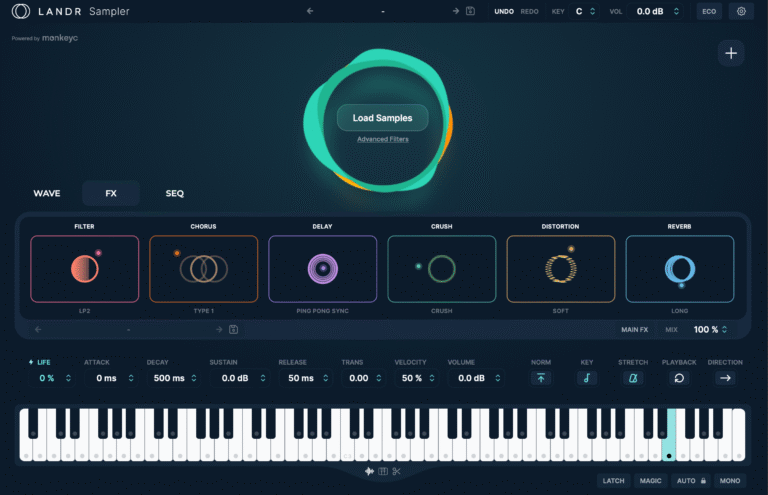
Once you have your sound, the Lander Sampler offers a comprehensive suite of tools to shape and mold it to fit your style. The built-in effects section is robust, featuring essentials like chorus, delay, crush, drive, and reverb. What really impressed me was the ability to change the algorithm for each effect. For instance, you can switch between a long, dreamy reverb for a pad and a tight, room reverb for a snare, all within the same plugin. The ADSR (Attack, Decay, Sustain, Release) controls are incredibly responsive, allowing for precise shaping of everything from a punchy kick to a gentle, swelling synth. Furthermore, the sample manipulation tools are top-notch. You can change the key of a sample, transpose it up or down, stretch it to fit your tempo, and even reverse it for some truly unique textures. The flexibility to apply these effects to individual sounds or the entire track via the “main effects” button opens up a world of creative possibilities, allowing for both intricate sound design and a cohesive overall mix.
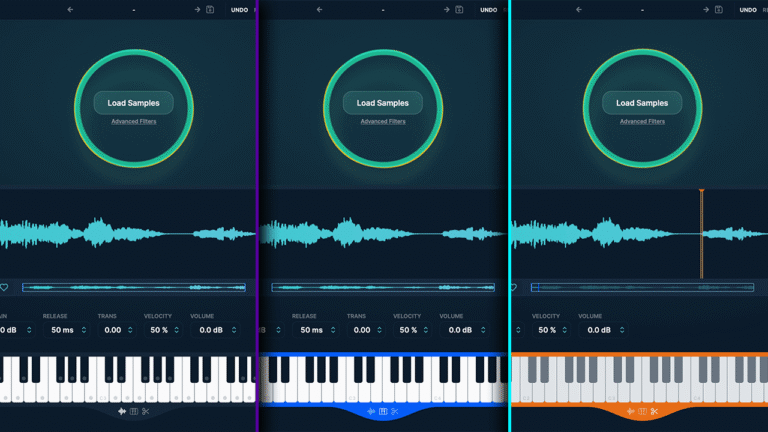
But where the Lander Sampler truly becomes a creative powerhouse is in its three distinct operational modes. Normal Mode is the perfect starting point for layering sounds and finding inspiration. I found it incredibly useful for building up complex drum patterns with one-shots, quickly auditioning different combinations to find the perfect groove. Chromatic Mode is a game-changer for melodic samples. It takes any melodic one-shot and instantly transforms it into a playable instrument, automatically mapped across your keyboard. This feature alone has unlocked so much melodic potential in sounds I would have otherwise overlooked. Finally, Slice Mode is a dream come true for anyone who loves to flip and chop samples. It automatically slices your samples into manageable pieces, making it incredibly easy to create new rhythmic patterns and melodic phrases.
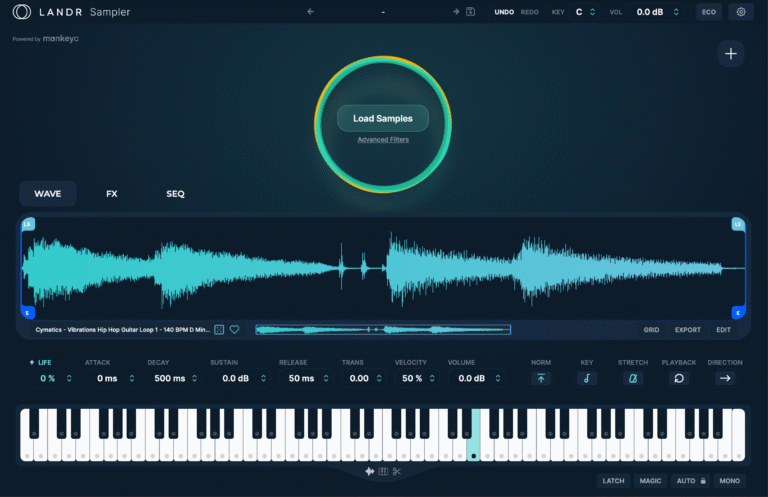
To really put it to the test, I built a trap beat from scratch. I started by finding a cool melodic loop and throwing it into Slice Mode. From there, I chopped it up into a new, more interesting pattern. I then used Chromatic Mode to turn a simple vocal chop into a lead melody. The auto-key and time-sync features were instrumental in this process, ensuring that every element I added was perfectly in key and on tempo, allowing me to build a professional-sounding track in no time.
In conclusion, the Lander Sampler plugin is a versatile, intuitive, and, most importantly, inspiring tool that has earned a permanent place in my production workflow. It’s a powerful creative partner that streamlines the technical aspects of music creation, allowing you to focus on what really matters: your ideas. Whether you’re a seasoned producer with a massive sample library or just starting your musical journey, I can’t recommend it enough. The Lander Sampler is available as a standalone purchase or as part of the Lander Studio subscription, which offers an incredible value with access to millions of samples, in-depth production courses, and unlimited music distribution.
I can also get you a 20% discount at checkout when subscribing to LANDR Studio Pro with this link: https://bit.ly/SimulationBeatsRefferal or if you prefer to buy Landr Sampler alone, you can find it here: https://glnk.io/5wllp/brett12p. I’m genuinely excited to see how this plugin will continue to push my creative boundaries, and I encourage you to give it a try and see what new ideas it can unlock for you. Happy Sampling!
AI Overview: